EASYDEPLOY — User Guide
EASYDEPLOY is a modern Windows deployment solution on WinPE, developed by CoreSystem. Boot your USB into WinPE and easydeploy.exe will start automatically. Just choose a deployment flow and the system will complete a fully automated Windows installation (11-step closed loop, hands-off) with rescue utilities ready when needed.
The interface ships with light and dark themes (dark by default). The main window presents the three deployment modes; the footer holds the Tools menu plus LAN and BitLocker status badges; and quick hardware information opens in a dedicated dialog from the title bar.
Video Demo
Section titled “Video Demo”Quick Start
Section titled “Quick Start”Get started with EASYDEPLOY — choose what fits your needs.
| Item | Description |
|---|---|
| What’s New in 5.0 | PowerShell 7 engine, ARM64 media, profile architecture, new Tools |
| Quick Start | Boot WinPE USB — Windows installs itself in 15 minutes |
| Deployment Modes | Standard / Business / Express (F3) — choose the right mode |
| Rescue Tools | Data rescue, backup, and hardware diagnostics |
MSP & Licensing
Section titled “MSP & Licensing”Manage service tiers and customize your USB for MSP operations.
| Item | Description |
|---|---|
| License Tiers | Free (perpetual, 2 profiles) / MSP Advanced (annual, unlimited) |
| Getting Started | Prepare your USB and user-config.json for the first deployment |
| BootBuilder | Build custom USB/ISO/WIM — Free (2 profiles) and Advanced (unlimited) |
| ARM64 Media | Build ARM64 WinPE media — native arm64 payloads, x64 app under emulation |
Advanced — Profile Customization
Section titled “Advanced — Profile Customization”Control how Windows is configured after installation.
| Item | Description |
|---|---|
| Profiles Overview | Profile concept, storage location, and injection mechanism |
| unattend.xml | Automate Windows Setup / OOBE (accounts, autologon, first-logon script) |
| Post-setup.ps1 | First-logon script — system tweaks and app installation |
| Creating a New Profile | Set up and test a standard profile for a new device |
Reference
Section titled “Reference”Detailed reference for configuration, shortcuts, offline mode, and troubleshooting.
| Item | Description |
|---|---|
| Configuration | system-config.json, user-config.json, and catalog data.json |
| Keyboard Shortcuts | Shortcuts on the WinPE main screen |
| Offline Mode | Offline license and offline/hybrid ESD source management |
| Troubleshooting | Common errors and fixes |
| Autopilot Hardware Hash | Capture the hardware hash in WinPE and import it into Intune |
| Inventory Data | What is recorded, file locations, field groups, privacy |
| Telemetry | Collection policy — no personal data or license keys collected |
| Glossary | Common terms (license, catalog, BYOC/BYOB, profile…) |
Architecture Overview
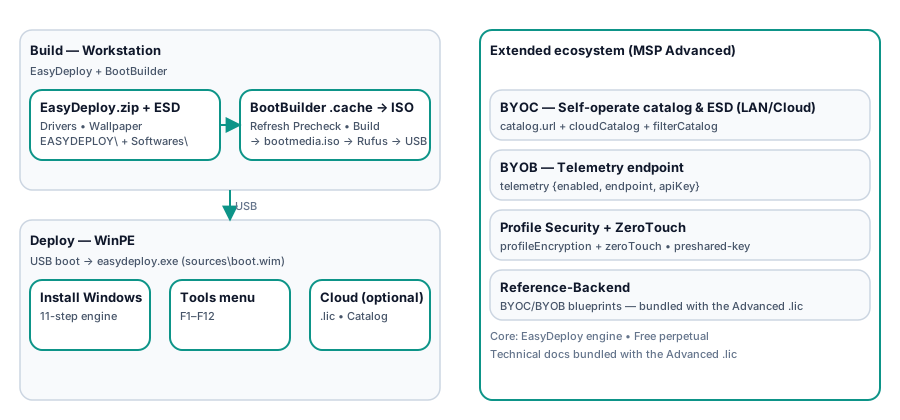
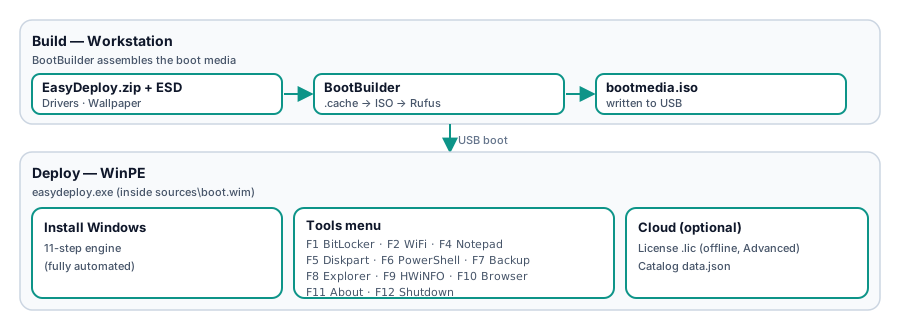
Section titled “Architecture Overview”EasyDeploy is the heart of the solution — the easydeploy.exe engine inside sources\boot.wim handles deployment. BootBuilder lets you build a WinPE USB in just a few clicks instead of spending weeks debugging drivers and the WinPE environment.
- Engine
EASYDEPLOY CLI: automates enterprise-grade Windows installation — under 5 minutes for all 11 deployment steps, plus about 10 minutes of automated post-install; with Hybrid and Offline support. Platform 5.0 runs on a PowerShell 7-only engine with CIM hardware access (no .NET Framework in WinPE). - Licensing: Offline License for Advanced —
*.licfile (ECDSA P-256, bound to USB-SN) placed on the USB. Free requires no license (perpetual). - OS Source: prefers
.esdalready on the USB (EASYDEPLOY\OS\); if not found, downloads from the Catalog over the internet (SHA-256 verified). Look up ESD download links at https://esd.coresystem.vn. - Profile: pair
unattend.xmlandPost-setup.ps1inEASYDEPLOY\Profiles\<Profile_Name>\. Free includes 2 profiles (1.Tweaks/2.TweaksApp) — just edit them directly; creating more has no effect (tip: keep your profile library on your workstation and overwrite the contents of the two original folders when needed). Advanced is unlimited — see Profiles Overview. - Rescue: Portable tools in
Softwares\on the USB — not included in the release package; bring your own and add them via BootBuilder (at build time) or a manual copy +user-config.json. Built-in additions: Autopilot hash capture and an offline Event Log viewer.
Extended Ecosystem (for MSP Advanced)
Section titled “Extended Ecosystem (for MSP Advanced)”When you need more control, Advanced adds:
- BYOC — self-host catalog & ESD (including on LAN).
- BYOB — self-host the inventory upload endpoint (private reference package).
- Profile Security & ZeroTouch — profile encryption with preshared-key, automated Boot USB → done (controlled environments only).
With Free, keys you add in
system-config.json/user-config.jsonfor the above will have no effect at runtime — the system uses defaults. See Configuration. Advanced details are in the technical docs bundled with the.lic.
Download Security
Section titled “Download Security”The EasyDeploy + BootBuilder binary pair is distributed by CoreSystem. Each release publishes a SHA-256 hash and a YubiKey signature (.sig). BootBuilder verifies its own signature on startup (fail-closed) and verifies EasyDeploy.exe.sig before building media; the EasyDeploy deploy client itself is validated at build time. See Getting Started.
Support
Section titled “Support”- Website: https://www.coresystem.vn
- ESD Catalog (lookup download links, offline/hybrid): https://esd.coresystem.vn
- Free: Docs only — enough for solo IT consultants and micro-MSPs.
- MSP Advanced: Email support for core features (add-ons excluded) — contact
support@coresystem.vn; Advanced plan inquiries:inquiry@coresystem.vn.